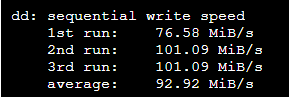
Yes, there are several ways to check whether a Virtual Private Server (VPS) is using a Solid State Drive (SSD) or a Hard Disk Drive (HDD). Here are a few options:
Check the VPS specifications: The provider should list the type of storage used in the VPS specifications. This is usually found on the website or in the documentation provided when you purchase the VPS.
Use the df command: You can use the df command in a terminal window to check the type of storage used by the VPS. This command will show you the file systems that are mounted on the VPS and the type of storage used for each file system.
Check the VPS control panel: Many VPS providers offer a control panel that allows you to manage and monitor the VPS. The control panel may include information about the type of storage used by the VPS.
Contact the VPS provider: If you are unable to find the information through any of the above methods, you can try contacting the VPS provider directly to ask about the type of storage used by the VPS.
It's important to note that some VPS providers may use a combination of SSD and HDD storage, so it's possible that the VPS may be using both types of storage.