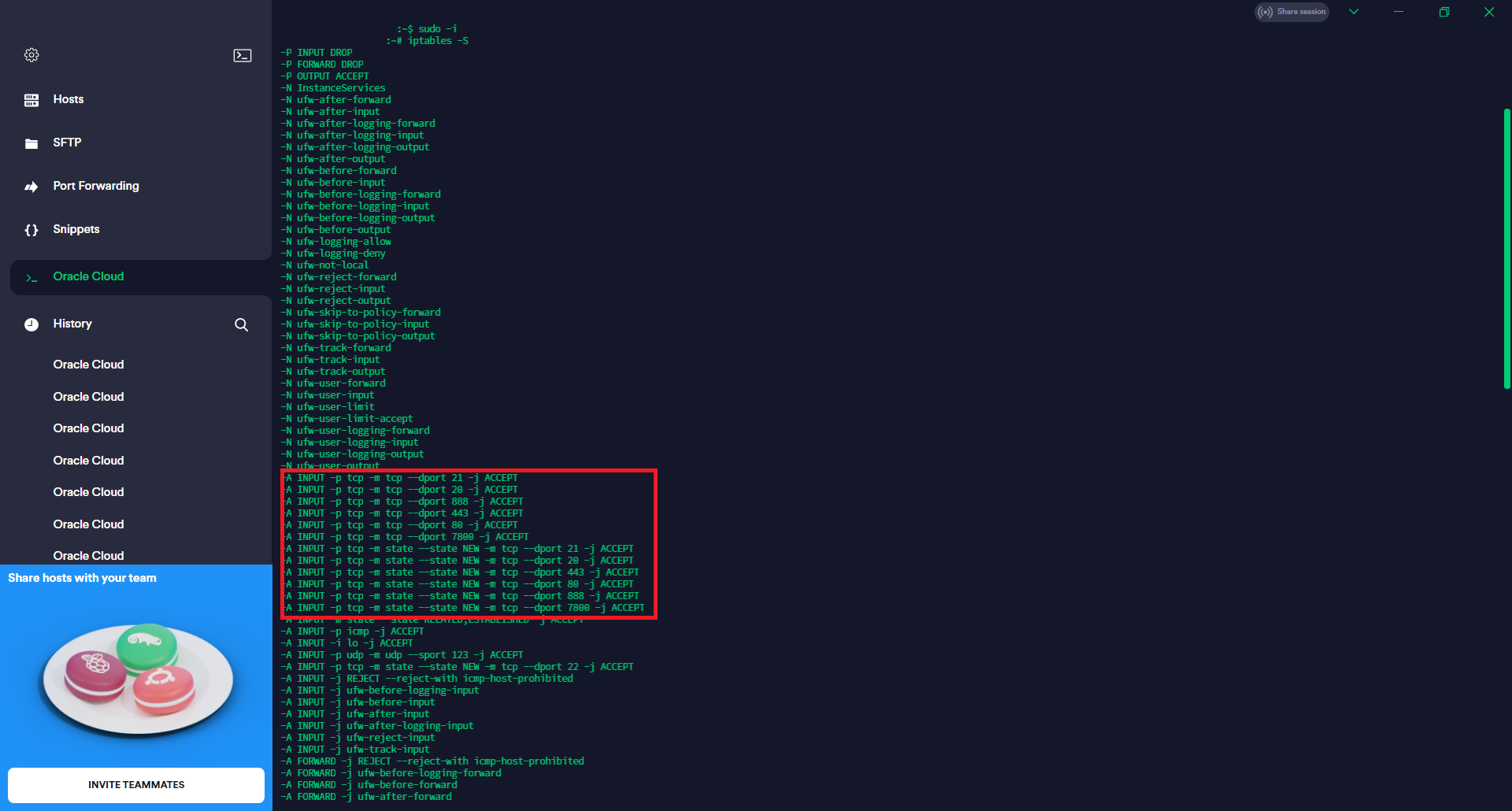
I just did a fresh install of aaPanel on a fresh Ununtu 20.04 install. As per the instructions I free up the suggested ports both in the security group and ufw.
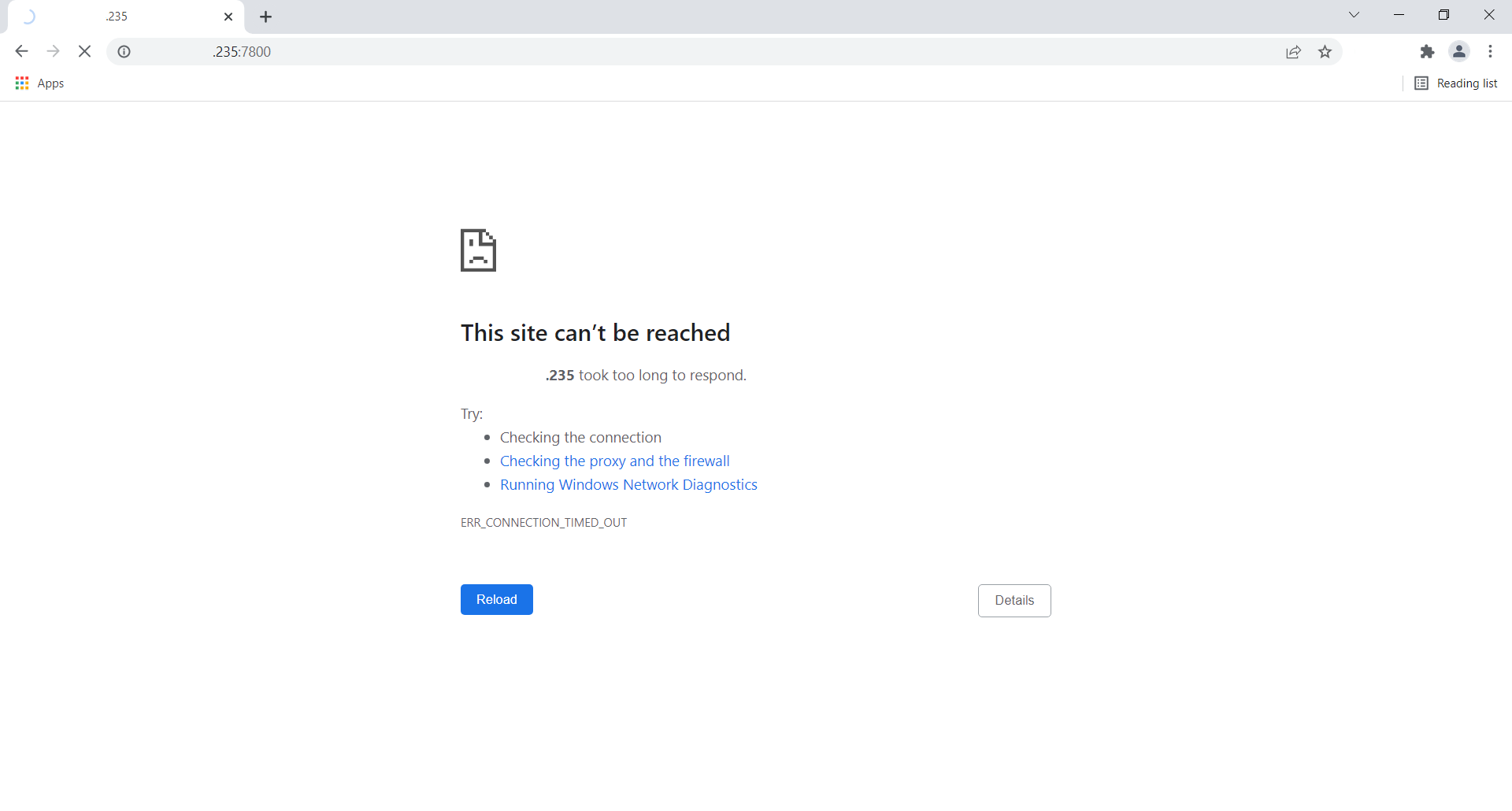
The error I am getting when accessing the panel is:
This site can’t be reached132.145.206.10 took too long to respond.
Try:
Checking the connection
Checking the proxy and the firewall
Running Windows Network Diagnostics
ERR_CONNECTION_TIMED_OUT
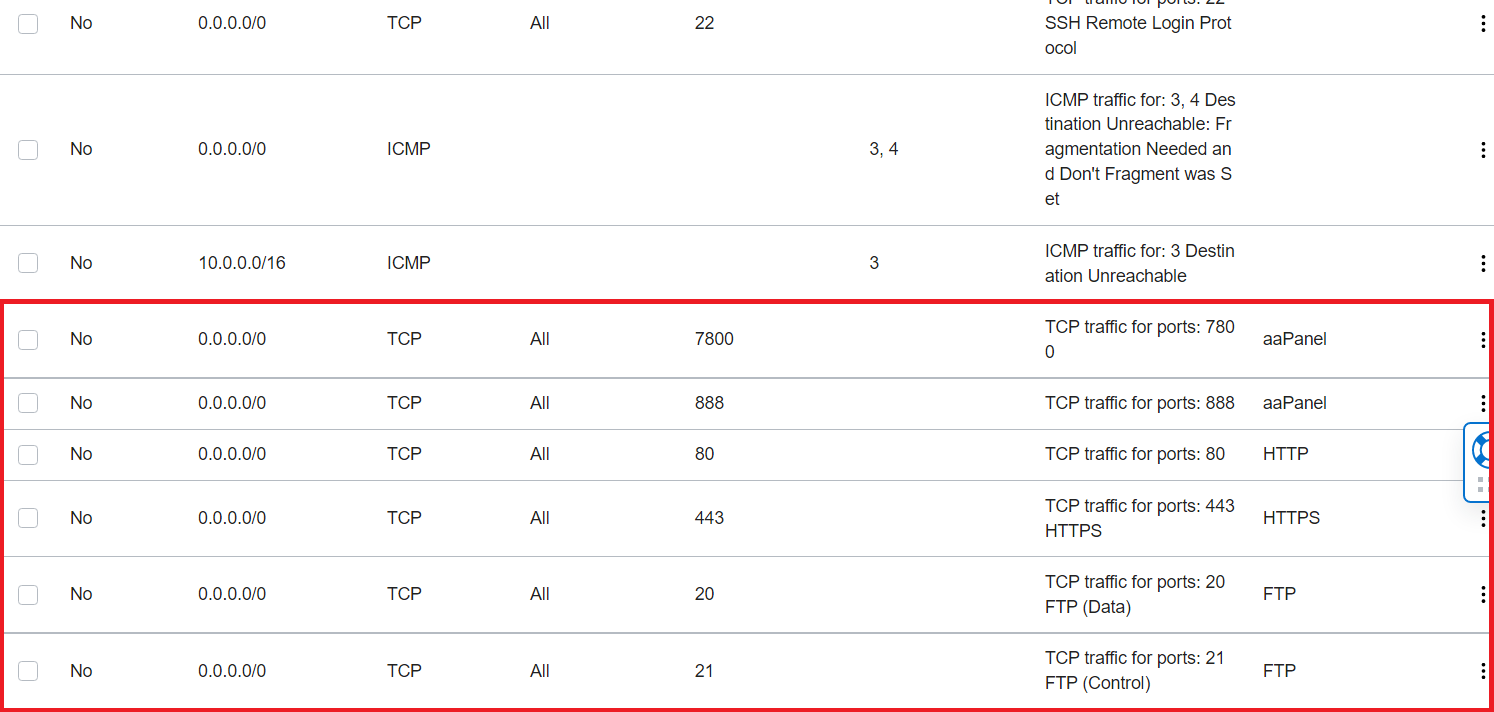
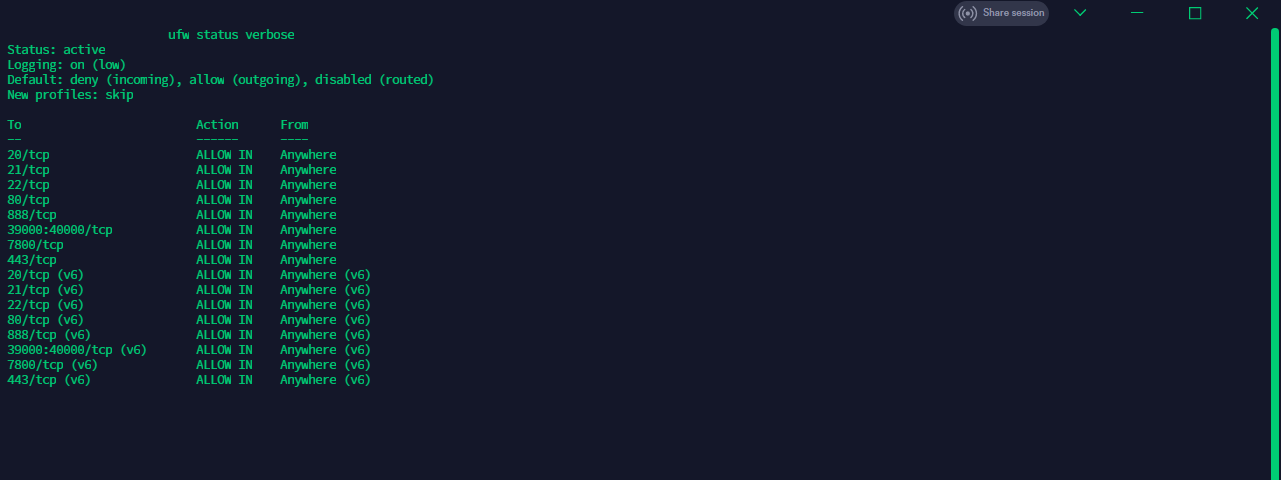
I already tried doing:
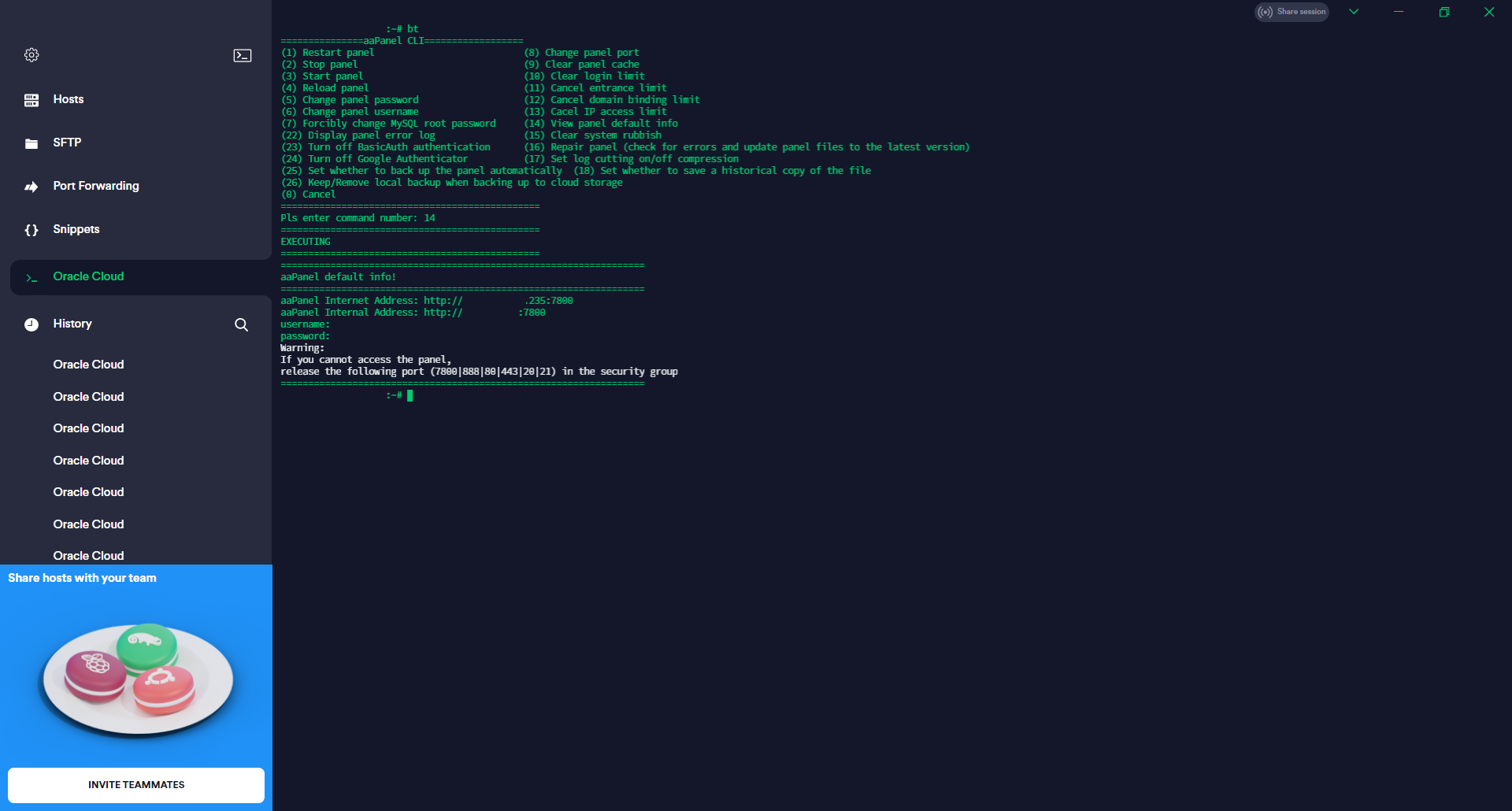
bt
===============aaPanel CLI==================
(1) Restart panel (8) Change panel port
(2) Stop panel (9) Clear panel cache
(3) Start panel (10) Clear login limit
(4) Reload panel (11) Cancel entrance limit
(5) Change panel password (12) Cancel domain binding limit
(6) Change panel username (13) Cacel IP access limit
(7) Forcibly change MySQL root password (14) View panel default info
(22) Display panel error log (15) Clear system rubbish
(23) Turn off BasicAuth authentication (16) Repair panel (check for errors and update panel files to the latest version)
(24) Turn off Google Authenticator (17) Set log cutting on/off compression
(25) Set whether to back up the panel automatically (18) Set whether to save a historical copy of the file
(26) Keep/Remove local backup when backing up to cloud storage
(0) Cancel
Pls enter command number:
16 to no success
22 outputs:
Pls enter command number:22
EXECUTING
Traceback (most recent call last):
File "class/public.py", line 1659, in set_own
user_info = getpwnam(user)
KeyError: "getpwnam(): name not found: 'www'"
During handling of the above exception, another exception occurred:
Traceback (most recent call last):
File "/www/server/panel/script/run_script.py", line 60, in <module>
start()
File "/www/server/panel/script/run_script.py", line 52, in start
project_model_auto_run()
File "/www/server/panel/script/run_script.py", line 37, in project_model_auto_run
run_object = getattr(tmp_mod.main(),'auto_run',None)
File "/www/server/panel/class/projectModel/nodejsModel.py", line 48, in init
public.set_own(self._www_home,'www')
File "class/public.py", line 1666, in set_own
user_info = getpwnam('www')
KeyError: "getpwnam(): name not found: 'www'"
I can access the panel internally:
curl 127.0.0.1:$(cat /www/server/panel/data/port.pl)/login;/etc/init.d/bt status
<!doctype html>
<html lang="zh">
<head>
<meta charset="UTF-8">
<meta http-equiv="X-UA-Compatible" content="IE=edge,chrome=1">
<meta name="viewport" content="width=device-width, initial-scale=1, maximum-scale=1">
<link rel="icon" href="/static/favicon.ico" type="image/x-icon" />
<link rel="shortcut icon" href="/static/favicon.ico" type="image/x-icon" />
<title>aaPanel Linux panel</title>
<link rel="stylesheet" type="text/css" href="/static/css/site.css?date=6.8.21">
<link rel="stylesheet" type="text/css" href="/static/css/login.css?date=6.8.21">
<script type="text/javascript">
function IEVersion() {
// 取得浏览器的userAgent字符串
var userAgent = navigator.userAgent;
// 判断是否为小于IE11的浏览器
var isLessIE11 = userAgent.indexOf('compatible') > -1 && userAgent.indexOf('MSIE') > -1;
// 判断是否为IE的Edge浏览器
var isEdge = userAgent.indexOf('Edge') > -1 && !isLessIE11;
// 判断是否为IE11浏览器
var isIE11 = userAgent.indexOf('Trident') > -1 && userAgent.indexOf('rv:11.0') > -1;
if (isLessIE11) {
var IEReg = new RegExp('MSIE (\\d+\\.\\d+);');
// 正则表达式匹配浏览器的userAgent字符串中MSIE后的数字部分,,这一步不可省略!!!
IEReg.test(userAgent);
// 取正则表达式中第一个小括号里匹配到的值
var IEVersionNum = parseFloat(RegExp['$1']);
if (IEVersionNum === 7) { // IE7
return 7
} else if (IEVersionNum === 8) { // IE8
return 8
} else if (IEVersionNum === 9) { // IE9
return 9
} else if (IEVersionNum === 10) { // IE10
return 10
} else { // IE版本<7
return 6
}
} else if (isEdge) { // edge
return 'edge'
} else if (isIE11) { // IE11
return 11
} else { // 不是ie浏览器
return -1
}
}
if (IEVersion() > -1 && IEVersion() < 9) {
window.location.href = '/tips';
}
</script>
</head>
<body>
<div class="main">
<div class="login">
<div class="account">
<form class="loginform" method="post" action="/login" onsubmit="return false;">
<div class="rlogo">aaPanel Linux panel</div>
<div class="line"><input class="inputtxt" value="" name="username" datatype="*"
nullmsg="User Name" errormsg="Format Error" placeholder="Account"
type="text">
<div class="Validform_checktip"></div>
</div>
<div class="line"><input class="inputtxt" name="password" value="" datatype="*"
nullmsg="Password" errormsg="Password" placeholder="Password"
type="password">
<div class="Validform_checktip"></div>
</div>
<div style="color: red;position: relative;top: -14px;" id="errorStr"></div>
<div class="line yzm" style="top: -5px;display:none;">
<input type="text" class="inputtxt" name="code" nullmsg="Verification Code"
errormsg="Verification Code Error" datatype="*" placeholder="Verification Error">
<div class="Validform_checktip"></div>
<img width="100" height="40" class="passcode"
onClick="this.src=this.src.split('?')[0] + '?'+new Date().getTime()" src="/code"
style="border: 1px solid #ccc; float: right;" title="Click to Change">
</div>
<div class="login_btn"><input id="login-button" value="Login" type="submit"></div>
<p class="pwinfo" style="display:none">Verification Code will be displaied after 3 times of login error</p>
<a class="resetpw" href="https://www.aapanel.com/forum/d/16-how-to-reset-password-for-aapanel-linux-6-x"
target="_blank">Forget Password>></a>
</form>
</div>
<div class="scanCode" style="display: none;">
<div class="titles"><span>Login with aaPanel Mobile</span></div>
<div class="qrCode" id="qrcode"></div>
<div class="scanTip">
<div class="list_scan">
<img src="/static/img/sCan.png" - />
<span>Scan with </span>
<span><a href="https://www.aapanel.com/forum/d/3527-aapanel-mobile" class="btlink"
target="_blank">aaPanel Mobile</a></span>
</div>
</div>
</div>
<div class="entrance" style="display: none;">
<div class="bg_img"></div>
<div class="tips">
<span><img src="/static/img/safety_ico.png"><span>QR code login is more secure</span></span>
<em></em>
</div>
</div>
</div>
</div>
<script type="text/javascript" src="/static/js/jquery-1.10.2.min.js"></script>
<script type="text/javascript" src="/static/language/zh-cn.js"></script>
<script type="text/javascript" src="/static/layer/layer.js"></script>
<script type="text/javascript" src="/static/js/jquery.qrcode.min.js"></script>
<script type="text/javascript" src="/static/js/Validform_v5.3.2_min.js"></script>
<script type="text/javascript" src="/static/js/md5.js"></script>
<script type="text/javascript">
$(function () {
function Wreset() {
var w = $(window).width();
var yzmw = $(".login .line").width() - 140;
if ($(".yzm").is(":visible") && w > 640) {
$(".login").css({
"height": "365px",
"margin-top": "-230px"
});
} else {
$(".login").removeAttr("style")
}
$(".login .yzm .inputtxt").width(yzmw);
}
Wreset();
var setTime = '';
$.get('/public?name=app&fun=login_qrcode', function (res) {
$('#qrcode').qrcode({
render: "canvas",
width: 150,
height: 150,
background: "#fefefe",
foreground: "#333",
text: res.status ? res.msg : 'https://aapanel.com/download/app.html'
});
$('.entrance').show();
}).error(function (res, textStatus, errorThrown) {
if (res.status == 404) {
$('.entrance').hide();
}
});
function controlTime() {
$.get('/public?name=app&fun=is_scan_ok', function (res) {
if (res.status) {
layer.msg('Scanning code succeeded, waiting...', {
icon: 1
});
clearInterval(setTime);
loginAdmin(res.msg);
}
});
}
function loginAdmin(key) {
$.get('/public?name=app&fun=set_login', {
secret_key: key
}, function (res) {
layer.msg(res.msg, {
icon: res.status ? 1 : 2
})
if (res.status) {
layer.msg('Secure login in progress,waiting...', {
time: 0,
shade: [0.4, '#fff'],
icon: 16
});
setTimeout(function () {
location.href = '/';
}, 1000);
}
});
}
$(".loginform").Validform({
tiptype: function (msg, o, cssctl) {
if (!o.obj.is("form")) {
var objtip = o.obj.siblings(".Validform_checktip");
cssctl(objtip, o.type);
objtip.text(msg);
}
}
});
$('.bg_img').click(function (event) {
if ($(this).hasClass('pc')) {
$(this).removeClass('pc');
$('.scanCode').hide().prev().show();
clearInterval(setTime);
$('.tips>span').html('<img src="/static/img/scan_ico.png"><span>Login with aaPanel mobile</span>');
} else {
$(this).addClass('pc');
$('.account').hide().next().show();
$('.tips>span').html('<img src="/static/img/safety_ico.png"><span>Switch account login</span>')
setTime = window.setInterval(controlTime, 2000);
}
});
$('#login-button').click(function () {
var username = $("input[name='username']").val().trim();
var password = $("input[name='password']").val().trim();
var code = $("input[name='code']").val().trim();
if (username == '' || password == '') {
layer.msg("Error, please try again!", {
icon: 2
});
return;
}
var data = {
username: md5(username),
password: md5(md5(password) + '' + '_bt.cn'),
code: code,
cdn_url: $("#static_cdn").val()
}
var loadT = layer.msg("Loading...", {
icon: 16,
time: 0,
shade: [0.3, '#000']
});
$.post('/login', data, function (rdata) {
if (rdata == '1') {
layer.close(loadT);
layer.open({
type: 1,
title: false,
area: ['350px', '265px'],
content: '<div class="verification_view">\
<div class="v_title">Google authentication</div>\
<div class="v_input"><input type="text" class="v_code" name="v_code" placeholder="Verification code"/></div>\
<div class="v_btn"><input id="auth_verif_btn" value="Log in" type="submit"></div>\
<div class="v_tips">* Please use the Google Authenticator app to get the verification code<br><a target="_blank" href="https://www.aapanel.com/forum/d/357-how-to-use-google-authenticator-in-the-aapanel" class="btlink">Unable to verify, click Help</a></div>\
</div>',
success: function () {
// 点击验证登录
$('[name="v_code"]').keyup(function (e) {
if (e.keyCode == 13) {
$('#auth_verif_btn').click();
}
});
$('#auth_verif_btn').click(function (e) {
data['vcode'] = $('[name="v_code"]').val().trim();
var loadT = layer.msg("Loading...", {
icon: 16,
time: 0,
shade: [0.3, '#000']
});
$.post('/login', data, function (rdata) {
layer.close(loadT);
if (!rdata.status) {
layer.msg(rdata.msg, {
icon: 2
});
return false;
}
layer.msg(rdata.msg, {
icon: 16,
time: 0,
shade: [0.3, '#000']
});
window.location.href = '/';
});
});
}
});
return false;
}
layer.close(loadT);
if (!rdata.status) {
$("#errorStr").html(rdata.msg);
$("input[name='password']").val('');
num = rdata.msg.substring(rdata.msg.indexOf('[') + 1, rdata.msg.indexOf(']'))
if (num < 5) {
$(".yzm").show();
$(".login").css("height", "332px");
$("input[name='code']").val('');
}
$(".yzm").show();
Wreset();
$(".passcode").click();
layer.msg(rdata.msg, {
icon: 2
});
return;
}
layer.msg(rdata.msg, {
icon: 16,
time: 0,
shade: [0.3, '#000']
});
window.location.href = '/';
});
});
if ("False" == 'True') {
$('.bg_img').addClass('pc');
$('.account').hide().next().show();
$('.tips>span').html('<img src="/static/img/safety_ico.png"><span>Switch account login</span>')
setTime = window.setInterval(controlTime, 2000);
}
$(window).on('resize', function () {
Wreset();
})
})
if (typeof (String.prototype.trim) === "undefined") {
String.prototype.trim = function () {
return String(this).replace(/^\s+|\s+$/g, '');
};
}
</script>
</body>
</html>Bt-Panel (pid 2392) already running
Bt-Task (pid 1035) already running
any ideas?